The Problem
- The n8n IMAP node requires polling intervals that introduce delays
- Managing IMAP credentials and connections in n8n is error-prone
- Email attachments are difficult to download and process reliably in n8n
- You need to keep n8n running constantly to catch incoming emails
- Classifying and extracting structured data from emails requires complex parsing
Why Existing Solutions Fall Short
IMAP triggers poll on intervals — missing the immediacy of real automation
OAuth setup for email providers is complex and tokens expire
Attachment handling requires manual storage configuration and brittle parsing
No built-in way to classify email content before routing it through your workflow
You shouldn't have to build this yourself.
How Mailhooks Solves This
Instant Webhook Trigger
Mailhooks fires a webhook the moment an email arrives — no IMAP polling, no missed messages.
Pre-parsed & AI-ready
Email arrives as structured JSON. Feed it straight into AI nodes for classification, extraction, or summarisation.
Attachments Included
Download attachments in n8n via URL — archive to OneDrive, Google Drive, S3, or any storage service.
Reliable Delivery
Mailhooks queues webhooks with retries — your workflow runs even if n8n was temporarily down.
Example: Automated Expense Processing
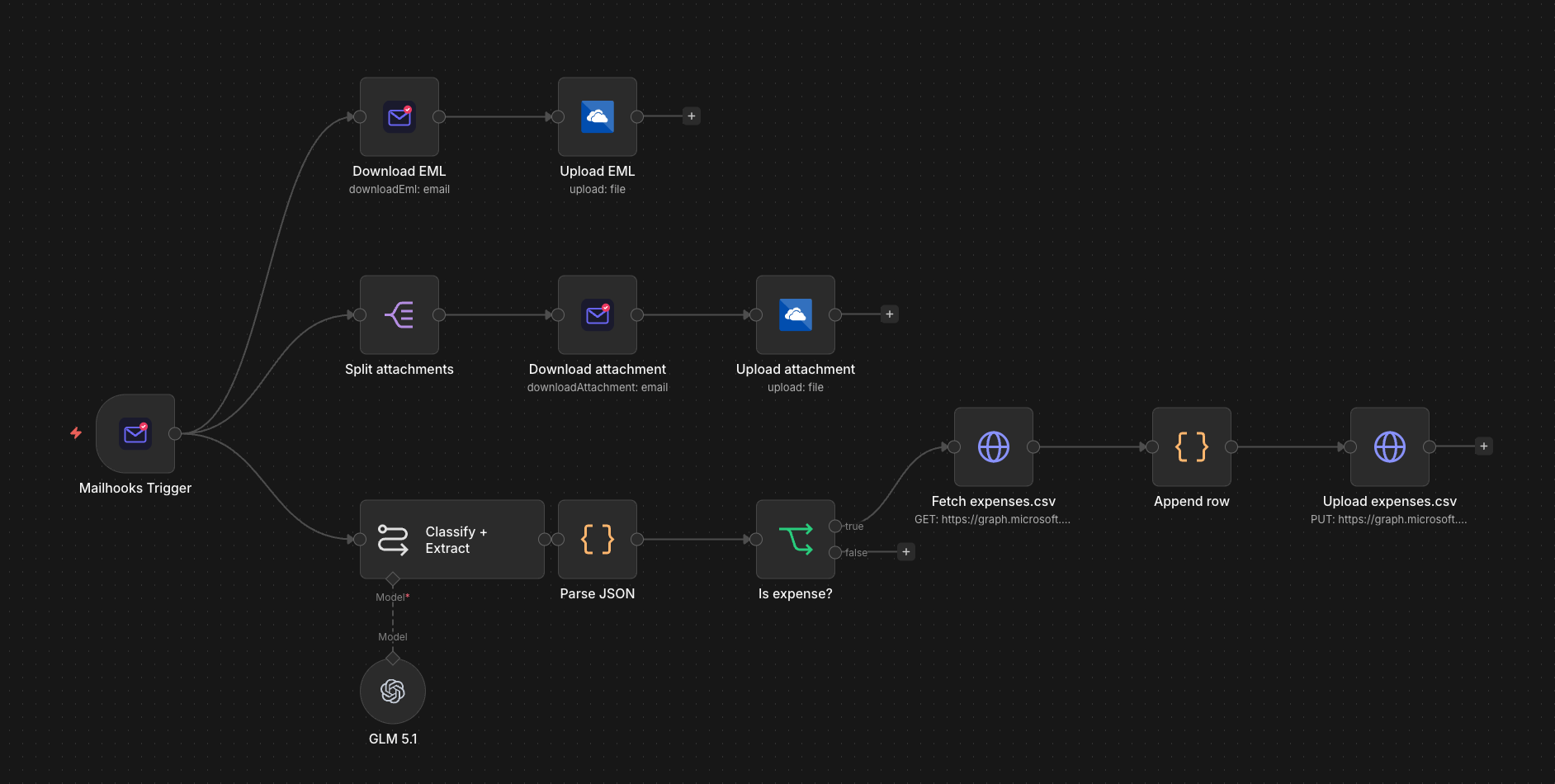
A real n8n workflow powered by the Mailhooks Trigger community node
Mailhooks Trigger
An email arrives at your Mailhooks inbox and instantly triggers your n8n workflow via webhook.
Archive email & attachments
The raw EML is saved to OneDrive. Attachments are split, downloaded, and uploaded to cloud storage in parallel.
Classify with AI
An AI node classifies the email and extracts structured data — vendor, amount, date, category.
Route by type
A conditional node checks if the email is an expense. Non-expense emails are ignored.
Update spreadsheet
The expense row is appended to a CSV on OneDrive via Microsoft Graph — your ledger stays up to date automatically.
Code Example
Mailhooks sends this JSON payload to your n8n Mailhooks Trigger node when an expense receipt arrives.
Webhook Payload
{
"id": "msg_exp_492",
"from": "[email protected]",
"to": "[email protected]",
"subject": "Invoice #1042 — Office Supplies",
"text": "Thank you for your purchase.\nTotal: $847.50\nDate: 2026-05-02\n\nSee attached invoice.",
"html": "Thank you for your purchase.
Total: $847.50
",
"attachments": [
{
"filename": "invoice-1042.pdf",
"contentType": "application/pdf",
"size": 52340,
"url": "https://files.mailhooks.dev/att/..."
}
]
}Handler Code
// n8n Mailhooks Trigger → AI Expense Workflow
//
// 1. Add a "Mailhooks Trigger" node (installs from n8n community nodes)
// 2. Connect your Mailhooks API key
// 3. Build your workflow using these expressions:
//
// Access email fields in any node:
//   {{ $json.from }}                  → sender email
//   {{ $json.subject }}               → email subject
//   {{ $json.text }}                  → plain text body
//   {{ $json.attachments[0].url }}    → first attachment URL
//
// After AI classification (Classify + Extract node):
//   {{ $json.vendor }}                → "Acme Supplies"
//   {{ $json.amount }}                → 847.50
//   {{ $json.date }}                  → "2026-05-02"
//   {{ $json.category }}              → "Office Supplies"
//   {{ $json.is_expense }}            → true
//
// Route with IF node → append to OneDrive CSV via HTTP Request
Frequently Asked Questions
No. Mailhooks replaces IMAP entirely with instant webhook delivery. There is no polling, no credential management, and no missed emails.
Anything that starts with an incoming email — expense tracking, order processing, support ticket creation, lead capture, document archival, notification routing, and more.
Yes. The structured JSON payload works with any AI node n8n supports — OpenAI, Anthropic, Google Gemini, or local models — for classification, extraction, or summarisation.
Mailhooks queues the webhook and retries delivery with exponential backoff. Your workflow will run as soon as n8n is available again.
Get Started in 3 Steps
Takes ~2 minutes — no email infrastructure required.
Create a Mailhooks account
Sign up for free in seconds.
Create an inbox
Get a unique email address for your use case.
Add your webhook URL
Point to your endpoint and start receiving emails.